About
What it does
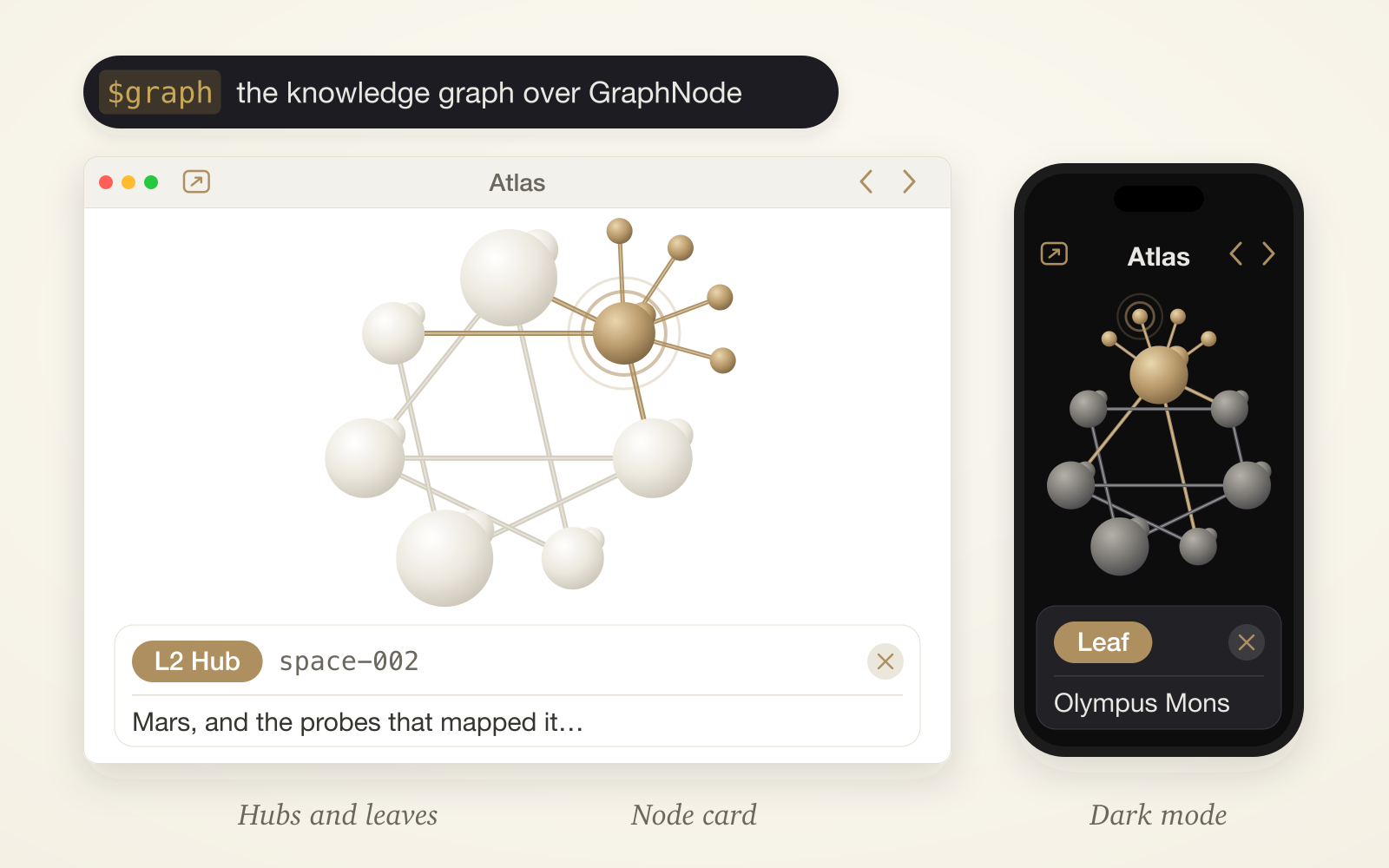
Show how an app's things connect, in 3D, without drawing it by hand. Say which of your types is a node (its id, its level, its text and the ids it links to), and which is an edge if you keep links apart, and graph writes the screen that shows them: hubs as large clay spheres round a circle facing you (or standing where their links pull them), each hub's leaves out around it while it is open, joined by thin cylinders, the selected node pulsing, and a frosted card over the bottom with its badge, its id and the start of its text. What it writes is plain SwiftUI and SceneKit that works in any app, with no Granite dependency in it.
What you can ask
$graph the knowledge graph over SeerKit's GraphNode, titled Atlas, badges like L2 Hub, Connecting… while it loads
$graph a map of the wiki's pages: depth is the level, PageLink joins two pages, prefixed Wiki
$graph the graph in the app's own fonts and accent, the text cut at 160 characters
$graph open on the graph of doc-1 and doc-2 when the app is launched with -destination map
$graph the nodes where their links pull them, the same every launch, and no title in the bar
Craft writes the call from your request, shows it on its agent map as graph-1, and builds and tests what it writes with the turn.
What you get
- The whole graph. A SceneKit scene with no backdrop of its own: hubs (level above 0) sized by their level, each a sphere with a lump or two that hovers; leaves (level 0) out only around their open hub; links as thin cylinders that swell slowly. The hubs stand round a circle, or, with
layout = force, where a force layout settles them, the same every launch for its seed. The open hub, its leaves and the selected node take your accent; every other sphere is near white in light mode and mid grey in dark. The built-in camera control turns, moves and zooms it, and the camera eases to the node you pick. - The card and the bar. The selected node's badge (
L2 HuborLeaf), its id and a close mark, then the start of its text; a tap opens all of it in a sheet. The bar fits the whole graph in view and steps through the nodes, level by level. A spinner shows while it loads, a symbol and your words when there is nothing, and Retry after a failure. - Your own types, shown as they are. One line a type says which field is the id, the level or the text; the views read protocols, and your types are made to conform to them, without a change to the types themselves.
- Your look and your words. Map the fonts and colours to your design's names. Every word is a key with a plain English default, and every radius, distance, symbol, material and motion is a key with a number.
- Views ready to drop in. They take values and closures, hold no global state and never route, so your app keeps its own navigation and presents the graph as it likes. Every view has a
#Preview, and every icon-only control is labelled for VoiceOver. - Screens reachable from a launch. A
-destinationlaunch argument opens the graph of the ids it names, the first hub selected, or with its whole text up, for UI tests and screenshots.
How it works
- It reads each line and refuses one it cannot read with the reason and what the line can say, every bad line at once, and writes nothing.
- It writes from templates and asks no model, so the same call makes the same files every time.
- Every file is parsed with
swiftc -parsebefore any lands, and they land together. A later call into the same folder writes the kit again and takes away what the new call no longer asks for. - What it makes is built and tested with the turn.
Works well with
graph writes the graph's screen; the other Rao Craft Agents fill in the rest. network and models write the types it maps, mocks the graph it shows before the server exists, design the fonts and colours its look maps to, and granite the page that shows its GraphView, the service that loads the nodes, and the sheet it opens in.
Get it
In Craft, install Graph from the Agent Store, or run craft agents add https://github.com/rao-craft/GraphAgent.git, then say $graph in a request.
Requirements
- A Mac on macOS 14 or later, with Xcode.
- The views target iOS 17 and macOS 14 and compile in Swift 5 and Swift 6 language modes. They are plain SwiftUI and SceneKit: no Granite, and no package to add.
- MIT licensed.
For developers
Every field, line, word, number and launch state a call can give is in the reference, and how graph is tested is TESTING.md.
How you ask
Say it in your own words
Type $graph and what you want. Craft fills these in for Graph.
8 optional
Optional 8
- Into
intoThe folder for the views, relative to the project; Components/Graph when left out
Text
- Mappings
mappingsOne line a role (node, edge):
node: GraphNode id=id level=level text=text neighbours=neighborIds,edge: Link from=source to=target; a bare path is read off the value, anything else is Swift that may namevalueList of text
- Imports
importsModules the conformances import, such as the package a mapped type is declared in
List of text
- Look
lookLook roles mapped to the app's names, one a line:
title = Font.brandTitle; roles title, note, note2, passage (Font), accent, foreground, hubBadge, leafBadge (Color); an unmapped role is the system's
Distribution
The package
- Repository
- github.com/rao-craft/GraphAgent · verified on GitHub
- Product
- GraphAgent in GraphAgent
- Pinned to
- aeb09c7
- Granite
- 35f7d7d
Creator

@rao · rao.nyc · 0 followers · More by @rao
Ambient, Craft and Veil. New York.

Graph
Free