About
What it does
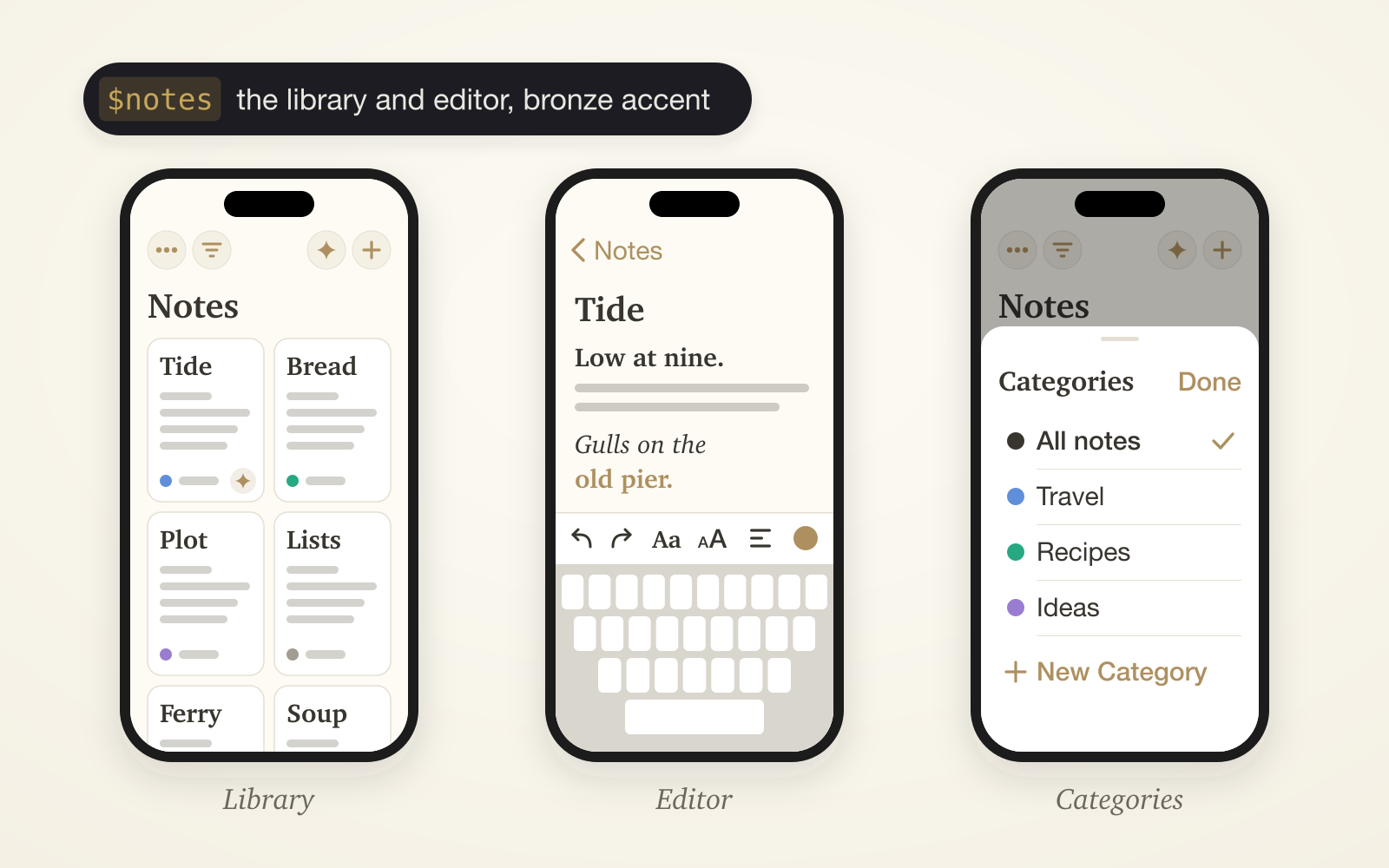
Give an app that keeps notes its library and its editor without drawing them by hand. Say which of your types is the note, and notes writes the grid of note cards, its bar, the empty states, the sheets that pick, add, rename and delete categories, and a rich-text editor with a formatting bar and a Format sheet. What it writes is plain SwiftUI that shows your own note type and calls your library service through closures. It has no Granite dependency in it.
What you can ask
$notes the library and note editor for the notes in SeerKit, with our serif type and bronze accent
$notes a journal: entries as notes, moods as categories, the title "Journal", highlights as memories
$notes the notes screens over the app's Page type, its views prefixed Kit
$notes add screenshot destinations for the grid and for the first note's editor
Craft writes the call from your request and shows it on its agent map as notes-1. It builds and tests what notes writes with the turn.
What you get
- The library.
- A grid of note cards in adaptive columns: the title, the date and time, the opening lines and the category's dot and name, newest first. A badge marks memories and notes that live only on your server.
- A bar with a more menu and a category filter on one side, and memories and a new note on the other.
- An empty state for no notes, and one for a filter with none.
- A long press to change a note's category, share it or delete it.
- Categories. A sheet that filters the grid by category, and edits, adds, recolours and deletes categories. A sheet that files a note, or makes a new category for it. A deleted category's notes move to the general one.
- The editor.
- A title and an attributed body, pushed from a card or in a sheet for a new note.
- A formatting bar over the keyboard: undo, redo, styles, size and alignment.
- A Format sheet of styles, size, alignment and colours, each acting on the selection or on what is typed next.
- A pushed note keeps its edits as it closes. A new one is saved with a toast your app draws.
- Your own types, shown as they are. One line says which field is the title, the body, the category and the date, and how to make an empty note. The views read protocols, and your types are made to conform to them, without a change to the types themselves. A field the editor changes is written back when it can be.
- Your look and words.
looklines map the accent, the card's colours and the fonts to your own names. Every string, symbol, size and timing is a key with a default you can set. - Screenshots and UI tests reach every state.
launchlines map a-destinationname to the grid, the memories, the category sheet, a new note (empty, or with its title and text already written), or a note's editor pushed. The views open there with no tap. - Ready to drop in.
- The views take values and closures and hold no global state.
- They present only their own sheets and the editor's push, so your app keeps its navigation.
- A control whose closure you leave out is not drawn.
- Every view has a
#Preview, and every icon-only control is labelled for VoiceOver. - iOS 26's glass is used where it exists, with a fallback, and iOS-only API stays behind
#if os(iOS), so the files build for the Mac too.
How it works
- It reads each line. If a line cannot be read, it refuses it with the reason and what the line may say instead, every bad line at once, and writes nothing.
- It checks each mapping against your types when they are in the project: a field that is not there, or one of a type the view cannot show, is refused.
- It writes from templates and asks no model, so the same call makes the same files every time.
- Every file is parsed with
swiftc -parsebefore any of them lands, and they land together.
Works well with
networkwrites the note type the mapping line names, andmocksthe notes it shows before there is a server.designwrites the colours and type scale thatlooklines name.granitewrites the library service whose events the closures call, and the page that showsNotesLibrary, with the launch aliases.
Get it
Install it from the Craft Agents store, or add it by hand with craft agents add. To link it into a Swift package:
.package(url: "https://github.com/rao-craft/NotesAgent.git", branch: "main")The agent registers itself with Granite's roster: an app that links it finds notes with nothing listed by hand. Schema/Notes.md lists every field, line, key and state, and TESTING.md how it is tested.
License
MIT, see LICENSE.
How you ask
Say it in your own words
Type $notes and what you want. Craft fills these in for Notes.
11 optional
Optional 11
- Into
intoThe folder for the views, relative to the project; Components/Notes when left out
Text
- Prefix
prefixA prefix for the kit's types when the app already has those names:
Kitwrites KitNotesLibraryText
- Mappings
mappingsOne line a role (note, category):
note: Note title=title body=body category=category date=createdAt new=Note(id: UUID().uuidString, title: "", body: "", category: "General", createdAt: Date()); a bare path is read off the value and written back, anything else is Swift that may namevalueList of text
- Imports
importsModules the conformances import, such as the package a mapped type is declared in
Distribution
The package
- Repository
- github.com/rao-craft/NotesAgent · verified on GitHub
- Product
- NotesAgent in NotesAgent
- Pinned to
- 3a019cd
- Granite
- 35f7d7d
Creator

@rao · rao.nyc · 0 followers · More by @rao
Ambient, Craft and Veil. New York.

Notes
Free