About
What it does
Give an app its account and preferences screens without drawing them by hand. Say which of your types is the signed-in account and which rows your settings need, and settings writes the profile, change password, settings, custom instructions and feedback screens that show them, in your words and your look. What it writes is plain SwiftUI that works in any app, with no Granite dependency in it.
What you can ask
$settings a profile and settings for the journal app: the account is Member, with spell check and text size rows
$settings Profile over SeerKit's Account, and Settings with Resonant Chat, Instructions and Feedback, in the app's serif look
$settings only the settings and feedback screens, prefixed Kit, beside the app's own profile
$settings add a Diagnose section with a Debug switch to the settings screens
Craft writes the call from your request, shows it on its agent map as settings-1, and builds and tests what it writes with the turn.
What you get
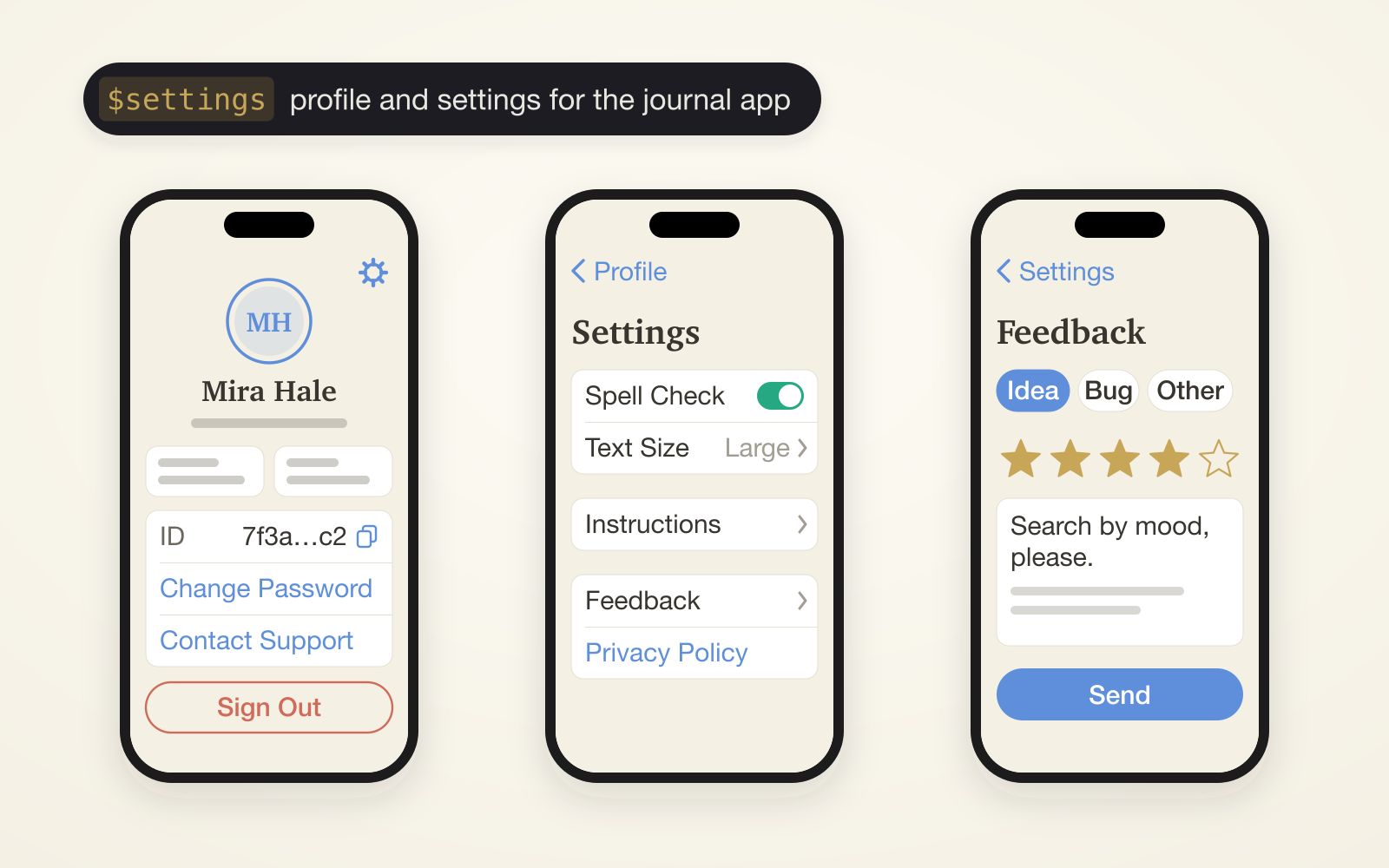
- A profile. The initials in a ringed circle, the name edited in place and the email; an overview of cells; the account's email and its ID, cut short and copied whole with a tap; Change Password (a sheet that mails a reset link) and Contact Support (a drafted mail); an outlined Sign Out; and a gear into Settings in its bar.
- Settings from your rows. One line a row: switches and choices stored in UserDefaults for your other screens to read, values, links, and pushes into Instructions and Feedback, in sections in the order you write them.
- Custom instructions. Presets to start from, an editor that can be cleared, and the editor saved as a preset under a name. What the person writes is stored where your assistant reads it.
- Feedback. A category, a rating in stars and a message, sent through your closure, then a thank-you.
- Your own account type, shown as it is. One line says which field is the name, the email and the id. The type is made to conform without a change to the type itself.
- Your words and your look. Every word by key, every colour, font and margin by role, every size, timing and symbol by key. Anything left out has a natural default, so the views build in any app.
- Views ready to drop in. They take values and closures, hold no global state and present only their own sheets and pages, so your app keeps its navigation; a control with no action is not drawn. A
-destinationlaunch argument opens any screen with its sheet up or its page pushed, for UI tests and screenshots. Every view has a#Preview, and every icon-only control is labelled for VoiceOver.
How it works
- It reads each line and refuses one it cannot read with the field, the line and what it accepts, every bad line at once, and writes nothing.
- It writes from templates and asks no model, so the same call makes the same files every time.
- Every file is parsed with
swiftc -parsebefore any lands, and they land together. A later call into the same folder keeps the screens and the prefix it finds there. - What it makes is built and tested with the turn.
Works well with
settings writes the account and preferences layer; the other Rao Craft Agents fill in the rest. network and models write the account type it maps, mocks the account it shows before the server exists, and granite the service whose events its closures call (load, rename, reset, feedback, sign out) and the page that shows its ProfileView.
Get it
In Craft, install Settings from the Agent Store, or run craft agents add https://github.com/rao-craft/SettingsAgent.git, then say $settings in a request.
Requirements
- A Mac on macOS 14 or later, with Xcode.
- The views target iOS 17 and macOS 14 and compile in Swift 5 and Swift 6 language modes, with Liquid Glass on iOS 26 and macOS 26 and a plain circle before. They are plain SwiftUI: no Granite, and no package to add.
- MIT licensed.
For developers
What a call takes and answers, every line, word, key and launch state are in the reference, Schema/Settings.md. The call that writes Seer's screens is Schema/examples/seer.json, and how the agent is measured is TESTING.md.
How you ask
Say it in your own words
Type $settings and what you want. Craft fills these in for Settings.
13 optional
Optional 13
- Into
intoThe folder for the views, relative to the project; Components/Settings when left out
Text
- Mappings
mappingsThe account's line:
account: Account name=name email=email id=id; a bare path is read off the value, anything else is Swift that may namevalue; the views show a SettingsAccountValue when left outList of text
- Imports
importsModules the conformance imports, such as the package the account type is declared in
List of text
- Look
lookOne line a look role mapped to the app's name for it:
accent = Color.accent,title = Font.brandTitle,gutter = CGFloat.layer7; an unmapped role is the system's
Distribution
The package
- Repository
- github.com/rao-craft/SettingsAgent · verified on GitHub
- Product
- SettingsAgent in SettingsAgent
- Pinned to
- 5c05ef8
- Granite
- 35f7d7d
Creator

@rao · rao.nyc · 0 followers · More by @rao
Ambient, Craft and Veil. New York.

Settings
Free